Grayson · Windows · Free & open source

Copy a file. Press one hotkey. Done.

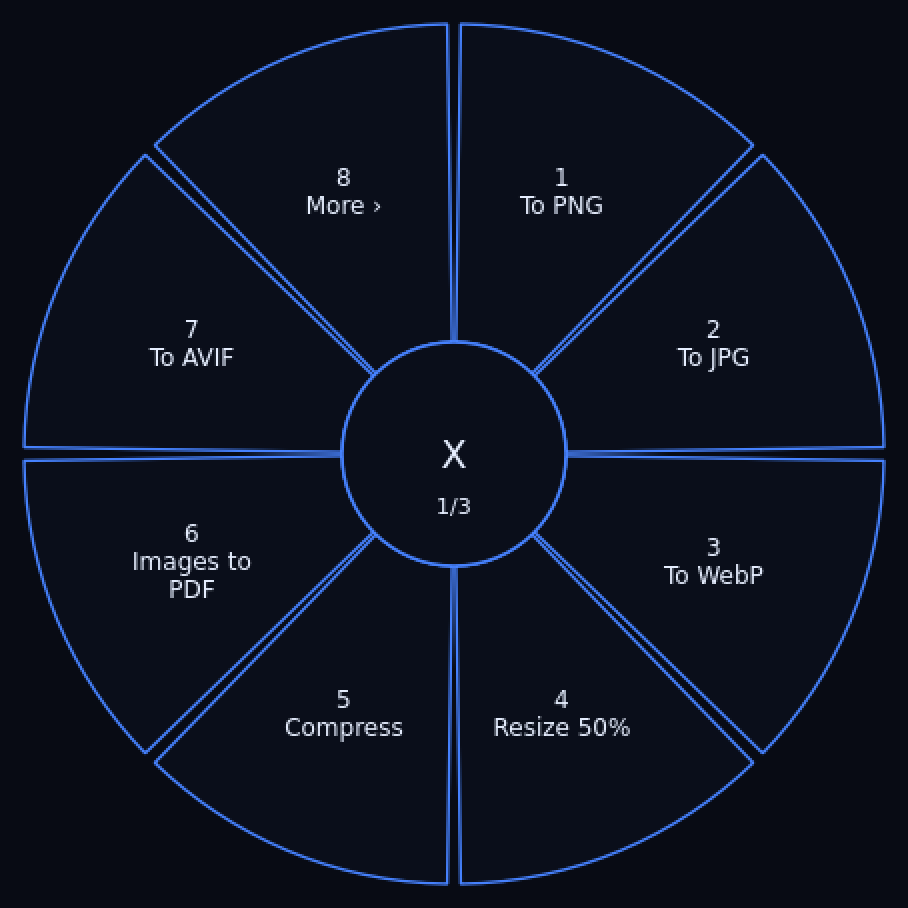
Grayson is a zero-click, fully offline file converter. Copy anything in Explorer, tap Ctrl+Shift+Space, and a ring menu opens at your cursor with exactly the things you can do to that file. Pick a slice. That's the whole interface.

v0.2.3 · installer, no admin needed · portable zip also available · PolyForm Noncommercial license

The Grayson ring menu open over an image file, offering conversion slices
The ring for an image file. Only actions that fit the file appear; more than eight page through under "More".

One ring, every conversion.

Everything runs on your machine. No upload, no account, no watermark, no conversion allowance. Output lands next to the original as name-grayson.ext and never overwrites anything.

Images

PNG, JPG, WebP, AVIF, HEIC…

Convert between nine formats, resize, compress, grayscale, rotate, crop, or fold a set of images into a PDF or Word doc.

Video

MP4, WebM, GIF, MKV…

Convert, compress, scale to 720p, strip audio, extract MP3 or WAV, trim and merge.

Audio

MP3, WAV, FLAC, Opus…

Convert between eight formats, compress, trim and merge.

PDF

Merge, split, shrink

Combine PDFs, split them, compress, export pages as images, or pull the text out.

Office

Word, PowerPoint, Excel

To and from PDF, ODT, HTML and more. Uses LibreOffice (free, one-time install) or falls back to Microsoft Office if you have it.

Command line

Scriptable engine

grayson a.pdf b.pdf --action pdf-merge — the CLI and the ring share one engine, so behaviour is identical.


How it works

Three ways in, one way out. Whichever you pick, the file never leaves your PC.

Ring menu

Copy file(s) in Explorer with Ctrl+C, press Ctrl+Shift+Space. The ring opens at your cursor — click a slice or press its number.

Drop zone

Prefer the mouse? Drag files straight onto the small Grayson window instead.

Command line

Batch work and scripts: grayson --list prints every action, and each one takes flags like --param start=5.

A heads-up, honestly. Grayson is Windows-focused — the engine is cross-platform, but the hotkey flow is packaged for Windows. Office conversions need LibreOffice installed. The installer isn't code-signed, so SmartScreen will warn once: click More info → Run anyway.

Get Grayson

Windows 10 or 11. The installer sets everything up per-user — no admin rights needed — and can be uninstalled from Settings → Apps like any other app.

Prefer source? pip install . from the repo. 54 tests, CI-built releases.